Create a Hand-Drawn Look in Minutes with This Editable Vector Text Effect
There is a specific warmth and authenticity that comes with a hand-drawn pencil sketch. It suggests creativity, a personal touch, and an immediate sense of artistry. For designers and creators, achieving this look traditionally requires time, skill with a tablet, or complex software techniques. The Illustrator Sketch Text Effect changes that dynamic entirely. It’s a specialized design asset that transforms your typed text into a realistic pencil sketch, complete with texture, depth, and character, all within a minute.
What Exactly is This Sketch Effect?
Think of it as a powerful, pre-built style template for Adobe Illustrator. At its core, it is an editable vector text effect. This means the final result is not a static image but a fully scalable, customizable vector. You receive a set of professional Illustrator files (EPS format) that work like a mockup creator. You simply open the template, click on the text, and type your own message. Instantly, your words adopt the nuanced, textured appearance of a pencil drawing.
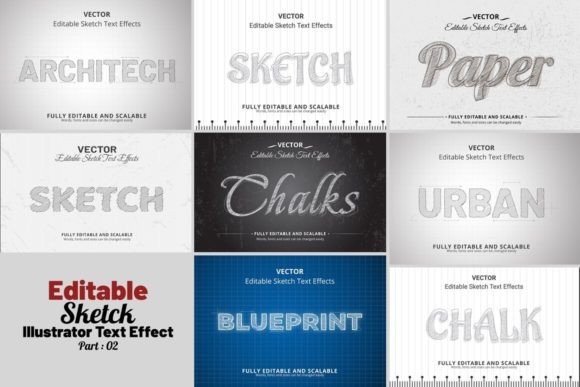
The product includes 06 different flavors or style variations. Each variation offers a distinct sketch personality—from a light, airy graphite look to a heavier, more expressive charcoal feel. This variety allows you to match the effect to the specific mood of your project, whether it's playful, sophisticated, or rustic.
Beyond the text itself, the package is comprehensive. Background elements are included, often with decorative touches that complement the sketch aesthetic. This saves significant time in composition. Crucially, everything is editable. The color of the sketch lines, the background, and the decorative elements can be changed. The text remains fully editable vector paths, meaning you can adjust kerning, leading, and even the letterforms themselves if needed. All layers are logically named and grouped, giving you full control over every component.
Where This Sketch Style Shines
The appeal of a hand-drawn sketch is its versatility and broad emotional resonance. This Editable Vector Text Effect excels in projects where a human, crafted touch is desired over a sterile, digital look.
- Branding & Logo Design: For brands in the artisan, eco-friendly, café, craft, or educational spaces, a sketch-style wordmark or logotype can instantly convey values of authenticity, creativity, and care. It works beautifully for a bakery’s logo, a workshop’s branding, or a children’s book author’s name.
- Marketing & Social Media: In the crowded digital landscape, a sketch effect helps graphics stand out. Use it for Instagram post headers, quote graphics, sale announcements, or story highlights. It adds a layer of visual interest that static fonts often lack, increasing engagement and shareability.
- Publishing & Editorial Design: Chapter titles in a book, pull quotes in a magazine, or section headers in a newsletter gain immense personality. It’s particularly effective for genres like cozy mystery, romance, or creative non-fiction where a whimsical or personal tone is key.
- Packaging & Product Design: On product labels, especially for gourmet foods, cosmetics, or stationery, a sketch font can communicate the product's handmade quality or natural ingredients. It helps create a shelf presence that feels approachable and distinctive.
- Personal & Craft Projects: From creating custom wedding invitations and party banners to designing printables for your Etsy shop or crafting a unique CV, this effect adds a professional yet personal flair that generic fonts cannot match.
Practical Guidance for Choosing and Using This Effect
While the tool is incredibly easy to use, thoughtful application will yield the best results. Here’s how to integrate it effectively into your workflow.
Evaluate the Project Fit. Ask yourself: does a sketch aesthetic align with the project’s core message and audience? It’s perfect for projects emphasizing creativity, tradition, or hands-on quality. For a corporate financial report or a minimalist tech startup, a clean sans serif font would likely be more appropriate. The sketch style carries a strong personality that must harmonize with your brand identity.
Test Readability and Hierarchy. Sketch effects are inherently textured, which can reduce clarity at very small sizes. Use this effect primarily for display typography—headlines, titles, logos, and short phrases. For body text or detailed information, pair it with a highly legible serif or sans serif font. This creates a clear visual hierarchy: the sketch for impact, a standard font for readability.
Explore the Included Styles. Don’t default to the first option. Take the time to apply your text to all six variations. One might be a tight, controlled pencil sketch, while another could be a loose, expressive scribble. Choose the one whose energy best matches your project’s tone. The ability to customize colors is also a powerful tool; changing the sketch from classic graphite to a branded color can make it uniquely yours.
Leverage the Full Asset Package. The included backgrounds and decorations are part of the value. Use them to quickly create cohesive scenes. For a social media graphic, placing your sketch text on one of the provided textured backgrounds can complete the design in moments, ensuring a professional, polished look without starting from scratch.
Understand the Technical Benefits. Because this is a vector-based effect, your final designs are infinitely scalable. You can use the same sketch text on a business card and a billboard without any loss of quality. The organized layers mean you can isolate and edit just the sketch lines, just the background, or just the decorations, offering unparalleled flexibility. It is compatible with a wide range of Adobe Illustrator versions, from CC2015.5 onwards, making it accessible to most working designers.
This Illustrator Sketch Text Effect is more than a novelty; it’s a practical, time-saving design asset. It empowers you to produce a specific, high-demand visual style—hand-drawn pencil typography—without needing advanced illustration skills. By understanding its strengths and applying it judiciously, you can add a layer of authentic, engaging personality to a wide array of creative projects, from your brand’s core identity to your latest social media campaign.